> ## Documentation Index
> Fetch the complete documentation index at: https://docs.joinmassive.com/llms.txt
> Use this file to discover all available pages before exploring further.
# Fire OS
> Integrate Massive SDK into your Fire OS application with this guide.
## Technical Requirements
| | |
| ----------------- | ------------------------ |
| Android SDK Level | `21 (Lollipop)` or later |
| Kotlin version | `1.9.0` or later |
| Java version | `17` or later |
### Permissions Needed
| |
| ------------------------------------------------- |
| `android.permission.INTERNET` |
| `android.permission.ACCESS_NETWORK_STATE` |
| `android.permission.FOREGROUND_SERVICE` |
| `android.permission.FOREGROUND_SERVICE_DATA_SYNC` |
| `android.permission.WAKE_LOCK` |
## Integration Guide
### Sample application
| | | |
| ---------------------------------------- | -------------------------------------- | ---------------------------------------------------------- |
| | Sample Application (Android / Fire OS) | [Download](https://partners.joinmassive.com/sdk/downloads) |
Massive SDK comes with a sample application showing project configuration, API integration, and consent screen.
To run the app, follow next steps:
1. Download the latest sample using the link above.
2. Unarchive and open the project in Android Studio.
3. Copy the API token from the [applications](https://partners.joinmassive.com/sdk/applications) page.
4. Set the token value to the variable `API_TOKEN` at the end of `MainActivity.kt`.
5. Build and run a target `sampleapp`.
### Dependency configuration
Add the dependency to your project Gradle configuration:
1. Add Massive maven repository to the dependency `repositories` used by the project. You can find the URL in the [downloads](https://partners.joinmassive.com/sdk/downloads) page.
It can be defined in different places depending on your project.
Common places are:
global **settings.gradle.kts**
```gradle theme={null}
dependencyResolutionManagement {
repositoriesMode.set(RepositoriesMode.FAIL_ON_PROJECT_REPOS)
repositories {
google()
mavenCentral()
maven {
url = uri("MASSIVE_MAVEN_REPO_URL")
}
}
}
```
project **build.gradle**
```gradle theme={null}
allprojects {
repositories {
google()
mavenCentral()
maven {
url uri("MASSIVE_MAVEN_REPO_URL")
}
}
}
```
2. In the build configuration file for your **app module** (*build.gradle.kts* / *build.gradle*), add the Massive SDK as a dependency:
```gradle theme={null}
dependencies {
implementation("com.joinmassive:sdk:1.+")
}
```
If you use a `toml` file for dependency configuration, add the following to the `toml`:
```gradle theme={null}
[versions]
massiveSdk = "massive_sdk_version_here"
[libraries]
massive-sdk = { group = "com.joinmassive", name = "sdk", version.ref = "massiveSdk"}
```
Then, define SDK dependency in the `gradle` file as:
```gradle theme={null}
dependencies {
implementation(libs.massive.sdk)
}
```
### Integration to the app
#### 1. Get the API token
Massive SDK API token is available in the [applications](https://partners.joinmassive.com/sdk/applications) page.
#### 2. Initialize MassiveClient
Interaction with Massive SDK starts with initializing the `MassiveClient` in your `Activity` or `Application` class. Ensure you do this at the start of the application lifecycle.
```kotlin theme={null}
class MainActivity : Activity() {
override fun onCreate(savedInstanceState: Bundle?) {
super.onCreate(savedInstanceState)
// Initialize MassiveClient
MassiveClient.init(API_TOKEN, this)
}
}
```
#### 3. Create client options
Next, fill in the client options to specify the desired running mode: *Foreground* or *Background* service.
*Foreground* service is preferable as it increases the earning potential. You can find more information about the difference in the [Technical details](#technical-details).
```kotlin theme={null}
val massiveOptions = MassiveOptions(
serviceType = MassiveServiceType.Foreground,
notificationOptions = MassiveNotificationOptions(
notificationTitle = getString(R.string.notification_title),
notificationText = getString(R.string.notification_content),
iconDrawable = com.joinmassive.sdk.R.drawable.massive_sdk_icon
)
)
```
#### 4. Request consent from the user
Before starting the client, obtain user consent for the terms of resource exchange. Please see our [launch checklist](https://www.joinmassive.com/launch-checklist-android) for additional details.
Here is the sample consent screen:
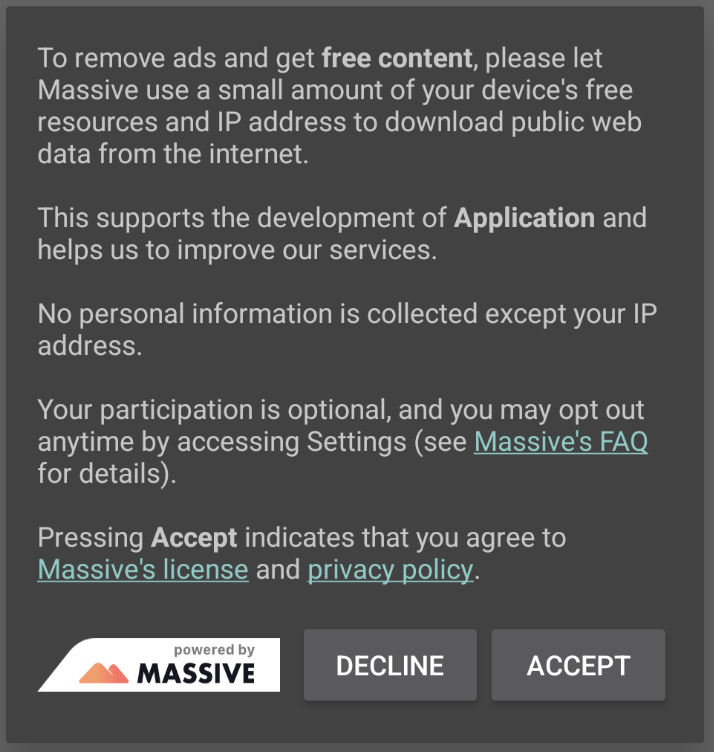 Example consent text
```
To remove ads and get free content, please let Massive use a small amount of your device's free resources and IP
address to download public web data from the internet.
This supports the development of Application and helps us to improve our services.
No personal information is collected except your IP address.
Your participation is optional, and you may opt out anytime by accessing Settings (see Massive's FAQ for details).
Pressing Accept indicates that you agree to Massive's license and privacy policy.
```
#### 5. Start usage after consent
After receiving the user's consent, start usage using the `start()` method and created options:
```kotlin theme={null}
// Check if there is user consent to use Massive and show the dialog if we need to request it.
if (!consentHelper.isConsentGiven()) {
consentHelper.showConsentDialog(
onAccept = {
// Start Massive if the user has given consent.
MassiveClient.start(massiveOptions) { result ->
result.onSuccess {
// Handle successful start.
}.onFailure { exception ->
// Handle start failure.
}
}
},
onDecline = {}
)
} else {
// If the user has already given consent, start Massive directly.
MassiveClient.start(massiveOptions) { result ->
result.onSuccess {
// Handle successful start.
}.onFailure { exception ->
// Handle start failure.
}
}
}
```
## Changes in the new Massive SDK 1.0
The new version of the Massive SDK introduces several significant changes aimed at improving usability, performance, and integration flexibility. Here is an overview of the key changes:
1. Dependency configuration: The dependency configuration process has been streamlined. Instead of manually setting up a local Maven repository, you can now directly add the Massive Maven repository to your project’s Gradle configuration. This simplification reduces setup time and potential errors, ensuring a more efficient integration of the SDK.
2. Changed package name: The name of the Massive SDK package has changed from `com.massive` to `com.joinmassive`.
3. Changed client interface: The `MassiveClient` has shifted from using a singleton instance to utilizing static methods. This change simplifies interaction with the SDK, making it more straightforward to initialize and manage the client throughout the application lifecycle.
4. Options handling: The process of providing options has been moved from the init stage to the `start` method. This allows for more dynamic configuration, enabling modification of the service options at the time of starting the client rather than during initialization. This separation ensures a quicker initialization process and more flexible configuration management.
5. Changed behavior of `stop`: The behavior of the stop method has been enhanced. In the new version, calling `stop` not only stops the usage but also shuts down the service entirely. This ensures that all operations are cleanly terminated and the service is properly shut down, providing a more robust mechanism for managing the SDK’s lifecycle.
6. Remote service: The Massive SDK service now runs as a separate process, enhancing the stability and performance of the main application.
### Migration from version 0.x
#### Dependency Configuration
* **Old Version**: Requires manually setting up a local Maven repository.
```bash theme={null}
mkdir project/repo
unzip massive-sdk.zip -d project/repo
```
```gradle theme={null}
repositories {
maven {
url = uri("/project/repo")
}
}
```
```gradle theme={null}
dependencies {
implementation("com.massive:sdk:0.+")
}
```
* **New Version**: Directly add the Massive Maven repository to the dependency `repositories`.
```gradle theme={null}
repositories {
maven {
url = uri("MASSIVE_MAVEN_REPO_URL")
}
}
```
```gradle theme={null}
dependencies {
implementation("com.joinmassive:sdk:1.+")
}
```
#### Initialization
* **Old Version**:
```kotlin theme={null}
MassiveClient.getInstance(context) { client ->
client.initAsync(MASSIVE_DEMO_API_TOKEN, massiveOptions, object : InitCallback {
override fun onSuccess() {
// Handle successful initialization.
}
override fun onFailure(message: String) {
// Handle initialization failure.
}
})
}
```
* **New Version**:
```kotlin theme={null}
MassiveClient.init(API_TOKEN, context)
```
#### Start and stop methods
* **Old Version**:
```kotlin theme={null}
client.start()
...
client.stop()
```
* **New Version**:
```kotlin theme={null}
MassiveClient.start(massiveOptions) {
it.onSuccess { // Handle Started state. }
it.onFailure { // Handle error. }
}
...
MassiveClient.stop() {
it.onSuccess { // Handle Stopped state. }
it.onFailure { // Handle error. }
}
```
#### State handling
* **Old Version**:
```kotlin theme={null}
// Async state handler.
client.listener = object : MassiveClientListener {
override fun onStateChange(newState: State) {
// Handle changed state.
}
}
...
// Current state.
client.state
```
* **New Version**:
```kotlin theme={null}
// Handle state after the action.
MassiveClient.start(massiveOptions) {
it.onSuccess { // Handle Started state or query the current state. }
it.onFailure { // Handle error. }
}
// Current state.
when (MassiveClinet.state()) {
MassiveClient.State.Starting -> {
}
MassiveClient.State.Started -> {
}
MassiveClient.State.Stopped -> {
}
}
```
## Technical details
1. Android permissions
Massive SDK defines the following permissions in the manifest file:
* `android.permission.INTERNET`
* `android.permission.ACCESS_NETWORK_STATE`
* `android.permission.FOREGROUND_SERVICE`
* `android.permission.FOREGROUND_SERVICE_DATA_SYNC`
* `android.permission.WAKE_LOCK`
These permissions will be automatically added to your app during the build.
2. Client initialization
Interaction with the SDK always begins with initialization using `MassiveClient.init`, which requires your API token. This initialization step is crucial and should be performed only once during the application’s lifecycle. Subsequent calls to `init` will have no effect. Attempting to re-initialize the SDK with a different API token will result in a `MassiveReinitException`, ensuring that the SDK maintains a single consistent state throughout the app’s runtime.
Since the SDK consists of client and service components, initialization can trigger synchronization of their states. To handle this scenario and achieve accurate state tracking, you can pass an additional callback to the `init` method. This callback will be called in the main thread after synchronization is complete.
3. User consent before starting the usage
Before starting the usage for the first time (using the `start()` method), it is mandatory to obtain user consent for the terms of resource exchange. This aligns with user privacy and control principles. Ensure that your application includes a clear and understandable consent mechanism.
```kotlin theme={null}
if (isUserConsentGiven) {
MassiveClient.start(massiveOptions) {}
}
```
4. Starting and stopping the client
Initialization of the `MassiveClient` with the `init()` method does not automatically launch the service or start the usage.
**It prepares the SDK for use but does not begin its operation.**
To ensure that the Massive is running, the `start()` method must be called after initialization and on each application relaunch. The `start()` method is designed to be idempotent, meaning it is safe to call multiple times. If the service is already started, subsequent calls to start will have no effect, preventing redundant operations.
The `stop()` method is used to stop and kill the service, effectively halting all operations and ensuring that the service is properly terminated. After calling `stop()`, you can restart the client by calling the `start()` method again, and it is possible to provide different options for the restart. This flexibility allows you to change the configuration or operational mode of the SDK as needed.
5. Client options and service types
Massive SDK can operate either as a *Background* or a *Foreground* service. The choice depends on your app's requirements and how you want to manage the SDK's resource usage.
* *Foreground Service*: Allow Massive to run more and less likely killed by the system but more visible with a customizable notification ensuring the user is aware of the service's operation.
**Running as a Foreground Service increases earning potential.**
* *Background Service:* Less intrusive, running silently without user interaction.
6. Customizing Foreground Service Notification
When running as a foreground service, Massive SDK allows customization of the notification displayed to the user.
You can set the title, text, and icon of the notification:
```kotlin theme={null}
val options = MassiveOptions(
serviceType = MassiveServiceType.Foreground,
notificationOptions = MassiveNotificationOptions(
notificationTitle = "Your Title",
notificationText = "Your Text",
iconDrawable = R.drawable.your_icon
)
)
```
Massive library contains a pre-defined drawable icon resource `com.joinmassive.sdk.R.drawable.massive_sdk_icon`, but you can also provide your own.
7. Usage tracking
The Massive SDK includes functionality for tracking and retrieving current traffic usage statistics. This allows you to monitor the SDK's data usage, providing insights into its network activity.
The `usage` method in the `MassiveClient` class fetches and returns the current traffic usage in *bytes*. Please check the sample application for an example of how to use the method to retrieve and display the traffic usage statistics.
8. SDK remote service
The latest version of the Massive SDK uses a remote service that is launched as a separate process. This service handles the core operations of the SDK independently of the main application process, providing better performance and stability.
9. ProGuard rules
Massive SDK AAR embeds required Android ProGuard rules which are applied automatically if you are using the R8 compiler.
If you, however, don’t use R8 you have to apply the rules below:
consumer-rules.pro
```gradle theme={null}
# Keep the public SDK entities
-keep class com.joinmassive.sdk.** { *; }
-keep interface com.joinmassive.sdk.** { *; }
-keep enum com.joinmassive.sdk.** { *; }
-dontwarn org.jetbrains.annotations.**
-keep class kotlin.Metadata { *; }
# Keep OkHttp3 and Moshi classes
-keep class com.squareup.okhttp3.** { *; }
-keep interface com.squareup.okhttp3.** { *; }
-keep class com.squareup.moshi.** { *; }
-keep interface com.squareup.moshi.** { *; }
-keepattributes Exceptions,InnerClasses,Signature,Deprecated,*Annotation*,EnclosingMethod
```
Example consent text
```
To remove ads and get free content, please let Massive use a small amount of your device's free resources and IP
address to download public web data from the internet.
This supports the development of Application and helps us to improve our services.
No personal information is collected except your IP address.
Your participation is optional, and you may opt out anytime by accessing Settings (see Massive's FAQ for details).
Pressing Accept indicates that you agree to Massive's license and privacy policy.
```
#### 5. Start usage after consent
After receiving the user's consent, start usage using the `start()` method and created options:
```kotlin theme={null}
// Check if there is user consent to use Massive and show the dialog if we need to request it.
if (!consentHelper.isConsentGiven()) {
consentHelper.showConsentDialog(
onAccept = {
// Start Massive if the user has given consent.
MassiveClient.start(massiveOptions) { result ->
result.onSuccess {
// Handle successful start.
}.onFailure { exception ->
// Handle start failure.
}
}
},
onDecline = {}
)
} else {
// If the user has already given consent, start Massive directly.
MassiveClient.start(massiveOptions) { result ->
result.onSuccess {
// Handle successful start.
}.onFailure { exception ->
// Handle start failure.
}
}
}
```
## Changes in the new Massive SDK 1.0
The new version of the Massive SDK introduces several significant changes aimed at improving usability, performance, and integration flexibility. Here is an overview of the key changes:
1. Dependency configuration: The dependency configuration process has been streamlined. Instead of manually setting up a local Maven repository, you can now directly add the Massive Maven repository to your project’s Gradle configuration. This simplification reduces setup time and potential errors, ensuring a more efficient integration of the SDK.
2. Changed package name: The name of the Massive SDK package has changed from `com.massive` to `com.joinmassive`.
3. Changed client interface: The `MassiveClient` has shifted from using a singleton instance to utilizing static methods. This change simplifies interaction with the SDK, making it more straightforward to initialize and manage the client throughout the application lifecycle.
4. Options handling: The process of providing options has been moved from the init stage to the `start` method. This allows for more dynamic configuration, enabling modification of the service options at the time of starting the client rather than during initialization. This separation ensures a quicker initialization process and more flexible configuration management.
5. Changed behavior of `stop`: The behavior of the stop method has been enhanced. In the new version, calling `stop` not only stops the usage but also shuts down the service entirely. This ensures that all operations are cleanly terminated and the service is properly shut down, providing a more robust mechanism for managing the SDK’s lifecycle.
6. Remote service: The Massive SDK service now runs as a separate process, enhancing the stability and performance of the main application.
### Migration from version 0.x
#### Dependency Configuration
* **Old Version**: Requires manually setting up a local Maven repository.
```bash theme={null}
mkdir project/repo
unzip massive-sdk.zip -d project/repo
```
```gradle theme={null}
repositories {
maven {
url = uri("/project/repo")
}
}
```
```gradle theme={null}
dependencies {
implementation("com.massive:sdk:0.+")
}
```
* **New Version**: Directly add the Massive Maven repository to the dependency `repositories`.
```gradle theme={null}
repositories {
maven {
url = uri("MASSIVE_MAVEN_REPO_URL")
}
}
```
```gradle theme={null}
dependencies {
implementation("com.joinmassive:sdk:1.+")
}
```
#### Initialization
* **Old Version**:
```kotlin theme={null}
MassiveClient.getInstance(context) { client ->
client.initAsync(MASSIVE_DEMO_API_TOKEN, massiveOptions, object : InitCallback {
override fun onSuccess() {
// Handle successful initialization.
}
override fun onFailure(message: String) {
// Handle initialization failure.
}
})
}
```
* **New Version**:
```kotlin theme={null}
MassiveClient.init(API_TOKEN, context)
```
#### Start and stop methods
* **Old Version**:
```kotlin theme={null}
client.start()
...
client.stop()
```
* **New Version**:
```kotlin theme={null}
MassiveClient.start(massiveOptions) {
it.onSuccess { // Handle Started state. }
it.onFailure { // Handle error. }
}
...
MassiveClient.stop() {
it.onSuccess { // Handle Stopped state. }
it.onFailure { // Handle error. }
}
```
#### State handling
* **Old Version**:
```kotlin theme={null}
// Async state handler.
client.listener = object : MassiveClientListener {
override fun onStateChange(newState: State) {
// Handle changed state.
}
}
...
// Current state.
client.state
```
* **New Version**:
```kotlin theme={null}
// Handle state after the action.
MassiveClient.start(massiveOptions) {
it.onSuccess { // Handle Started state or query the current state. }
it.onFailure { // Handle error. }
}
// Current state.
when (MassiveClinet.state()) {
MassiveClient.State.Starting -> {
}
MassiveClient.State.Started -> {
}
MassiveClient.State.Stopped -> {
}
}
```
## Technical details
1. Android permissions
Massive SDK defines the following permissions in the manifest file:
* `android.permission.INTERNET`
* `android.permission.ACCESS_NETWORK_STATE`
* `android.permission.FOREGROUND_SERVICE`
* `android.permission.FOREGROUND_SERVICE_DATA_SYNC`
* `android.permission.WAKE_LOCK`
These permissions will be automatically added to your app during the build.
2. Client initialization
Interaction with the SDK always begins with initialization using `MassiveClient.init`, which requires your API token. This initialization step is crucial and should be performed only once during the application’s lifecycle. Subsequent calls to `init` will have no effect. Attempting to re-initialize the SDK with a different API token will result in a `MassiveReinitException`, ensuring that the SDK maintains a single consistent state throughout the app’s runtime.
Since the SDK consists of client and service components, initialization can trigger synchronization of their states. To handle this scenario and achieve accurate state tracking, you can pass an additional callback to the `init` method. This callback will be called in the main thread after synchronization is complete.
3. User consent before starting the usage
Before starting the usage for the first time (using the `start()` method), it is mandatory to obtain user consent for the terms of resource exchange. This aligns with user privacy and control principles. Ensure that your application includes a clear and understandable consent mechanism.
```kotlin theme={null}
if (isUserConsentGiven) {
MassiveClient.start(massiveOptions) {}
}
```
4. Starting and stopping the client
Initialization of the `MassiveClient` with the `init()` method does not automatically launch the service or start the usage.
**It prepares the SDK for use but does not begin its operation.**
To ensure that the Massive is running, the `start()` method must be called after initialization and on each application relaunch. The `start()` method is designed to be idempotent, meaning it is safe to call multiple times. If the service is already started, subsequent calls to start will have no effect, preventing redundant operations.
The `stop()` method is used to stop and kill the service, effectively halting all operations and ensuring that the service is properly terminated. After calling `stop()`, you can restart the client by calling the `start()` method again, and it is possible to provide different options for the restart. This flexibility allows you to change the configuration or operational mode of the SDK as needed.
5. Client options and service types
Massive SDK can operate either as a *Background* or a *Foreground* service. The choice depends on your app's requirements and how you want to manage the SDK's resource usage.
* *Foreground Service*: Allow Massive to run more and less likely killed by the system but more visible with a customizable notification ensuring the user is aware of the service's operation.
**Running as a Foreground Service increases earning potential.**
* *Background Service:* Less intrusive, running silently without user interaction.
6. Customizing Foreground Service Notification
When running as a foreground service, Massive SDK allows customization of the notification displayed to the user.
You can set the title, text, and icon of the notification:
```kotlin theme={null}
val options = MassiveOptions(
serviceType = MassiveServiceType.Foreground,
notificationOptions = MassiveNotificationOptions(
notificationTitle = "Your Title",
notificationText = "Your Text",
iconDrawable = R.drawable.your_icon
)
)
```
Massive library contains a pre-defined drawable icon resource `com.joinmassive.sdk.R.drawable.massive_sdk_icon`, but you can also provide your own.
7. Usage tracking
The Massive SDK includes functionality for tracking and retrieving current traffic usage statistics. This allows you to monitor the SDK's data usage, providing insights into its network activity.
The `usage` method in the `MassiveClient` class fetches and returns the current traffic usage in *bytes*. Please check the sample application for an example of how to use the method to retrieve and display the traffic usage statistics.
8. SDK remote service
The latest version of the Massive SDK uses a remote service that is launched as a separate process. This service handles the core operations of the SDK independently of the main application process, providing better performance and stability.
9. ProGuard rules
Massive SDK AAR embeds required Android ProGuard rules which are applied automatically if you are using the R8 compiler.
If you, however, don’t use R8 you have to apply the rules below:
consumer-rules.pro
```gradle theme={null}
# Keep the public SDK entities
-keep class com.joinmassive.sdk.** { *; }
-keep interface com.joinmassive.sdk.** { *; }
-keep enum com.joinmassive.sdk.** { *; }
-dontwarn org.jetbrains.annotations.**
-keep class kotlin.Metadata { *; }
# Keep OkHttp3 and Moshi classes
-keep class com.squareup.okhttp3.** { *; }
-keep interface com.squareup.okhttp3.** { *; }
-keep class com.squareup.moshi.** { *; }
-keep interface com.squareup.moshi.** { *; }
-keepattributes Exceptions,InnerClasses,Signature,Deprecated,*Annotation*,EnclosingMethod
```